
Built by a moving company, for moving companies
Survey the home room by room. Walk out with a finished Weight & Cube Sheet.
Log every item from a 400+ item catalog, or photograph a room and let AI Photo Scan list it for you. The app totals the weight, cube, and boxes as you go, and when you're done you send a professional PDF and Excel report on the spot.
Your plan also works in the browser on iPad, iPhone, Amazon Fire tablets, and computers.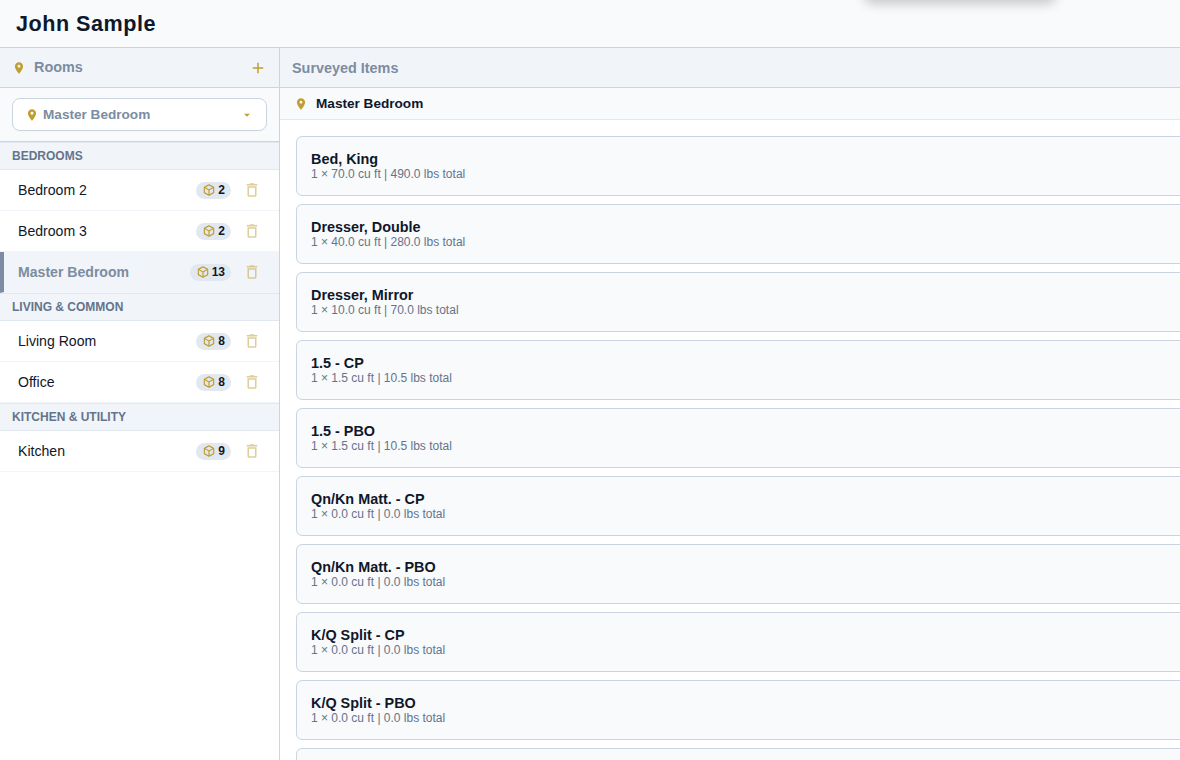
Everything an estimator needs in the house
We built it for our own crews at Luxury Moving Solutions in Colorado: clear on a tablet, simple on a phone, and it doesn't need signal.
Room by room
Walk the house in order. Add items from the catalog, type a quantity or tap plus and minus, and add custom rooms and items for anything unusual.
Weight and cube, automatically
Cubic feet and estimated weight total as you go. Set your own weight factor (7 lbs per cu ft by default) or override any single item.
Box counts that add up
Carton and packing counts for both CP and PBO box types, summarized for the crew and the customer.
Photos and notes
Take photos or pick from the gallery, then crop and mark them up in red to flag damage or special handling. Notes go on any item or the whole move.
Made for the whole crew
Each estimator gets their own account and PIN, admins manage users, and the app locks itself when you step away.
Private by design
Your customers' records and photos stay on your device, not on our servers. Back up to Google Drive, iCloud Drive, or email in one tap.
AI Photo Scan
Take 1 to 6 photos of a room, or import a customer's list or another mover's estimate (PDF, Word, Excel), and get a suggested item list from the catalog. You review every suggestion; nothing is added until you tap Add.
Descriptive Inventory and tags
Print the move-day inventory form from the survey, with every piece numbered, condition codes and signatures (Professional and Enterprise). On Enterprise, print matching tag labels on Avery 5160 sheets.
Written estimates
Turn the survey into a priced estimate the customer can sign on your device: local or long distance, added lines like vehicle transport, and starting wording based on the federal rules for interstate moves. Enterprise.
A report your customer can trust
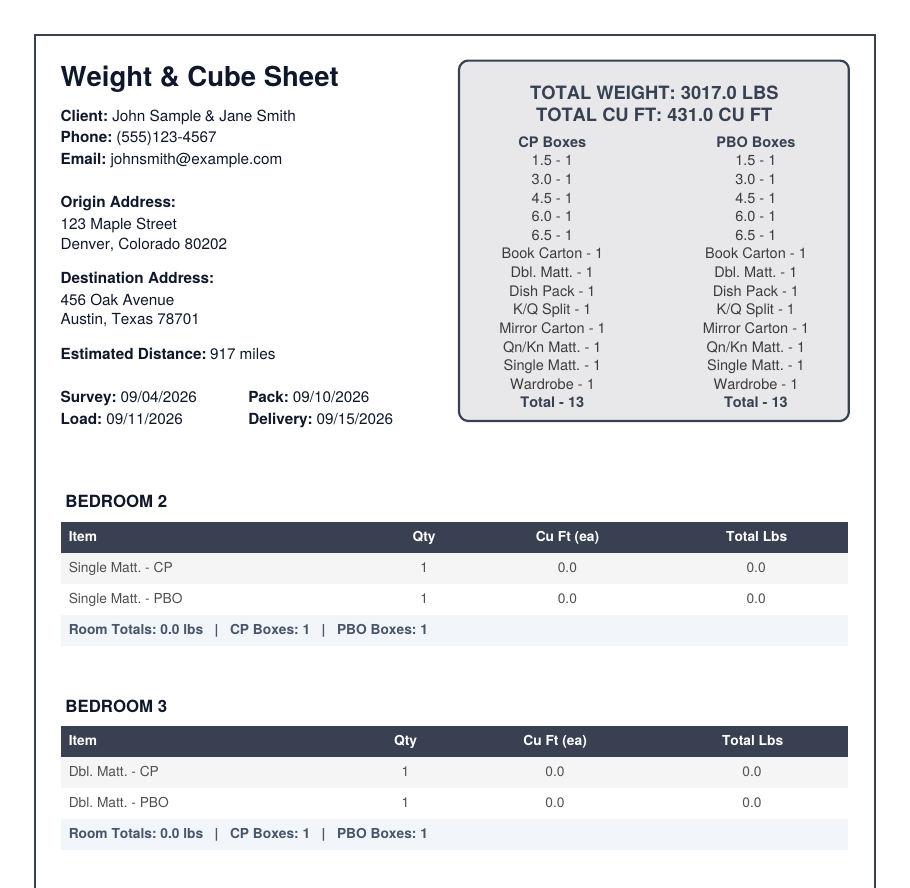
Finish the walkthrough and generate a Weight & Cube Sheet PDF and an Excel inventory in seconds, ready to email or share from your device.
- Total weight and cubic feet up front, with every room broken out
- CP and PBO box summary on the first page
- Move photos and notes included
- Your logo, watermark, and colors on Professional and Enterprise
- A signed Descriptive Inventory form for move day on Professional and Enterprise
- A written estimate the customer signs on your device, on Enterprise
Up and running in five minutes
No setup call, no hardware, no training day.
Install from Google Play
On an Android phone or tablet, install Client & Inventory Management and choose a plan inside the app.
Add your crew
Create a PIN for each estimator, and on Professional or Enterprise, add your logo and colors.
Run your first survey
Add a client, walk the rooms, and send the report before you leave the driveway.
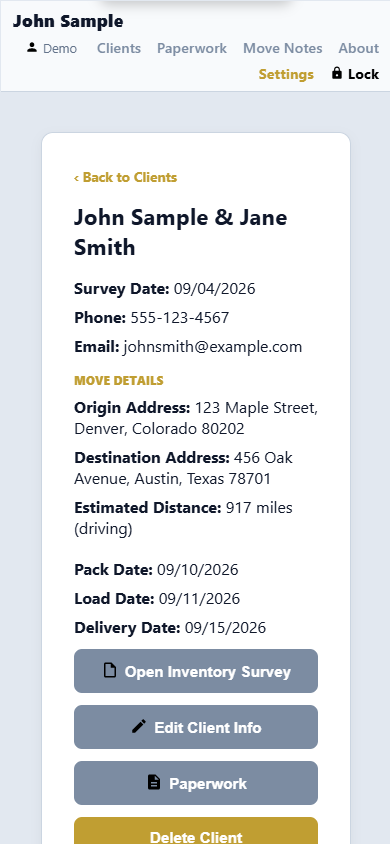
On the tablet in your truck, or the laptop in your office
Buy through Google Play, then use the same plan in the web browser on iPad, iPhone, Amazon Fire tablets, and Windows or Mac computers. Your access code is in Settings > Plan & Billing.
- ZIP codes fill in city and state, with an estimated driving distance
- Pack, load, and delivery dates on every client
- Keeps working with no signal once it's installed
Simple plans
Every plan includes full surveys, PDF and Excel reports, photos and notes, and multiple crew members.
Starter
$99.99
per year · up to 3 devices
- Full survey features
- PDF and Excel reports
- 10 free AI Photo Scan photos
- Custom branding
Professional
$299.99
per year · up to 5 devices
- Everything in Starter
- Your logo, watermark and colors
- Descriptive Inventory form
- Branded Excel exports
Pro + AI Scan
$399.99
per year · up to 5 devices
- Everything in Professional
- AI Photo Scan: 200 photos a month
- 14-day free trial for new subscribers
Enterprise
$599.99
per year · 10 devices, more on request
or $999.99 for 2 years, paid once
- Everything in Pro + AI Scan
- AI Photo Scan: 500 photos a month
- Written estimates customers can sign
- Printed tag labels
- 14-day free trial on the yearly plan
- Priority support (reply within 48 hours)
- New business tools first
Plans are purchased inside the app through Google Play. Yearly plans renew each year until canceled, and you can cancel anytime in the Google Play Store; the 14-day free trials are for eligible new subscribers. Enterprise for 2 years is a single payment that does not renew on its own; the app reminds you before it ends, and buying another 2 years keeps the same access code. Prices in U.S. dollars; Google Play shows your final price at checkout.
Questions
Do I need an Android device?
To buy a plan, yes: plans are purchased through the Google Play app on an Android phone or tablet. After that, the same plan works in the web browser on iPad, iPhone, Amazon Fire tablets, and computers.
Does it work without cell signal?
Yes. Once the app is installed and opened with a connection, surveys, photos, and reports all work offline. It only needs internet to activate your plan and look up ZIP codes and driving distance.
Where is my customers' information stored?
On your own device. We never receive your clients' names, addresses, inventories, or photos. That also means you should back up regularly: Settings > Back Up Now saves a file to Google Drive, iCloud Drive, or your email.
Can several estimators use it?
Yes. Each person gets their own name and PIN, and admins can add or remove users. Each device keeps its own clients, and you can move them between devices with Back Up Now and Import.
Can I put my company's logo on the reports?
On Professional and Enterprise, yes: your logo, a watermark, and your theme color appear on both the PDF and the Excel report.
What is AI Photo Scan (and document import)?
Take 1 to 6 photos of a room and the app suggests the items it sees, matched to the catalog with counts. You check every suggestion and only add what's right. You can also import a customer's list or another mover's estimate (PDF, Word, Excel, CSV or photos of a paper list, up to 10 pages) and the app adds the same items to your survey; each page counts as one photo. It needs a connection, and it's included on Pro + AI Scan (200 photos a month) and Enterprise (500 a month); Starter gets 10 free photos to try it.
What can the estimates do?
On Enterprise, the survey's weight, cube and cartons fill in a written estimate priced from your own price list. Pick local or long distance and binding, non-binding or not-to-exceed, type over any price, and add lines such as vehicle transport, piano handling or third-party services. Interstate estimates start from wording based on the federal rules, with the FMCSA booklet links; in-state estimates use your state wording, with a Colorado starting point built in. The customer signs on your device or on paper, and every version is saved with the client. The wording is a starting point, not legal advice: you are responsible for your estimates, so have it checked for your company.
How does Enterprise for 2 years work?
It's one payment that covers 2 years and doesn't renew automatically. The app reminds your admins 30 days before it ends. Buy another 2 years anytime in the app and the time is added to your current end date, with the same access code, so nobody has to sign in again.
How do I cancel?
Starter, Professional, Pro + AI Scan and Enterprise (yearly) are yearly subscriptions you can cancel anytime in the Google Play Store under Payments & subscriptions. Your plan keeps working until the end of the year you paid for. Enterprise for 2 years has nothing to cancel: it simply ends unless you buy another 2 years.
Your next survey could be the last one on a clipboard
Install it today and run your next walkthrough on a tablet.